
minart
"We need to first be limited in order to become limitless,”
- Phil Hanson
About
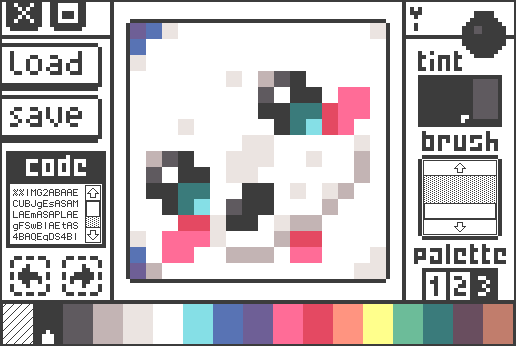
minart is an extremely minimalist workspace for creating itty-bitty pixel art, like so:
 ~ "Squeak!"
You can run it from your browser here, or download it for offline use. This art program was specially made to make it easier to create and import small sprites for Decker projects on mobile devices.
How to Use
By default, when minart loads, the blank canvas will be opaque white and your brush will be a small, 1x1 black pen. Try drawing!
If your image needs a little adjusting, clicking on the sides of the canvas frame or using w-a-s-d will shift the image one pixel at a time.
| Load | You can upload 16x16px .gif, .bmp, and .png images. If you're loading a sprite created in minart, you'll want to make sure the palette is set to the same one used when making it. |
| Save | Images created in minart are always palette-restricted, 16x16px .gifs. During the save prompt, you'll have the option of scaling up the final image by 2x (32x32px) or 4x (64x64px). * It's recommended to routinely back up your image to save your drawing progress. |
| Code | Since minart was created in Decker, images can be encoded and imported to other decks using a string you can generate by clicking on the 'code' header. |
| Tint | You can select a new brush color by clicking anywhere on the bottom-most row. The first entry, which is a lined pattern, represents transparency. Once a color is selected, the 'tint' menu on the top right will display a complimentary swatch. You can click on the swatch colors to temporarily swap your brush color. |
| Brush | The brush modal on the right has two arrows to swap between available brushes. Using the slider, the brush can be made bigger (higher value) or smaller. (On desktop, your scrollbar will work here!) |
| Palette | There are three palettes to choose from: default, vivid, and pastel. You can click or use the numbered tabs or keys 1-2-3 to swap between them. |
Click on the heart-dotted i to visit the advanced settings page.
From there, you can edit the color palettes directly or import your own! ^^
Keyboard Shortcuts
Quit - O | Fullscreen - P
Load - N |Save - M
Undo - Z | Redo - X
Scroll through brushes - 2
Smaller brush - 1 | Bigger brush - 3
Lighter Tint - R | Darker Tint - F
Shift color left - Q | Shift color right - E
Move image - W,A,S,D
Credits
This program was created using Decker , with UI work done in Aseprite. All of the sprites in the background image were made in minart. Everything provided here is free to learn from and create with. Please do not re-upload or use my work to train AI.
If you'd like to embed minart on your own website, you can use the following code:
<iframe frameborder="0" src="https://itch.io/embed-upload/17018480?color=5f5a5f" allowfullscreen="" width="640" height="380"><a href="https://missooni.itch.io/minart">Play minart on itch.io</a></iframe>
minart.zip Contents
| /source/ | Unlocked versions of the deck that allow editing. |
| /sprites/ | A handful of free sprites you can edit and practice with. |
| LICENSE.txt | Open source, MIT license. |
| bg.png | Tiled background pattern, used for minart.html and index.html, |
| index.html | Display version of minart, lacking the 'close' and 'fullscreen' buttons. |
| minart.html | Standalone .html version of minart that runs in browser. |
| minart.deck | .deck version of minart that can run on native or web Decker. |
Download
Development log
- V1.3 - Brushes, keyboard shortcuts and bug fixes!Apr 01, 2026
- Version 1.2 ChangelogMar 13, 2026
- Version 1.1 ChangelogFeb 16, 2026
- Minart Released!Feb 12, 2026
Comments
Log in with itch.io to leave a comment.
It was perfect, perfect in every way, down to the last minute details
i came from Millie's zine! this is awesome :)
Thank you so much!!
The first palette is bundled in all Decker projects by default. I made the 'vivid' and 'pastel' palettes by tinting colors from that original set of sixteen, I'm really happy you like them.
The palette swapping is a feature from Decker itself - it's so cool!
Yippee, it's fun!
Yayy! Thank you so much mini-Phinxel.
Thank you for mentioning me in your zine, making awesome stuff, and helping other people feel seen!
Aww thanks for reading it haha! I'm glad you liked seeing the mention and I hope it's got other people try this out!
wish there was an undo button :/
Added in the most recent version! Thank you for the feedback. ^^